How to Stop Losing Amazon Affiliate Commissions on YouTube
Find broken Amazon links, review out-of-stock products, and fix tracking mistakes in your YouTube descriptions with a practical affiliate link audit.
Your older YouTube videos can keep attracting viewers long after you publish them. But the product links underneath those videos need maintenance. A recommended microphone might disappear, a short link might stop resolving, or a replacement URL might lose its affiliate tracking.
You cannot guarantee a commission from every click. You can, however, remove avoidable friction between a viewer's interest and the product you intended to recommend. Start with the descriptions on videos people are still watching.
1. Check the destination before blaming the commission rate
Open a few of your most-viewed product reviews, tutorials, or setup videos. Follow the Amazon links in each description and ask:
- Does the link reach the intended product?
- Is that exact model still available for the viewer's region?
- Does the link open the appropriate Amazon marketplace?
- Does the description clearly identify what the viewer will find?
A page that loads successfully can still be the wrong destination. For example, a camera accessory listing may now show a different size or variant. Automated checks can flag technical problems; a quick manual review helps catch those mismatches.
Prioritize videos with ongoing views and clear purchase intent. Fixing a broken product link on a tutorial viewers use every day is often a better starting point than reviewing every upload in chronological order.
2. Find broken and out-of-stock links in batches
Paste your channel handle or URL into CreatorLinks. The scanner fetches five videos and extracts the web links from their descriptions. You can also paste a single video URL to investigate a viewer's report.
For Amazon product links, CreatorLinks follows redirects, checks the HTTP response, and looks for availability signals and affiliate tracking parameters. Other website links receive HTTP checks.
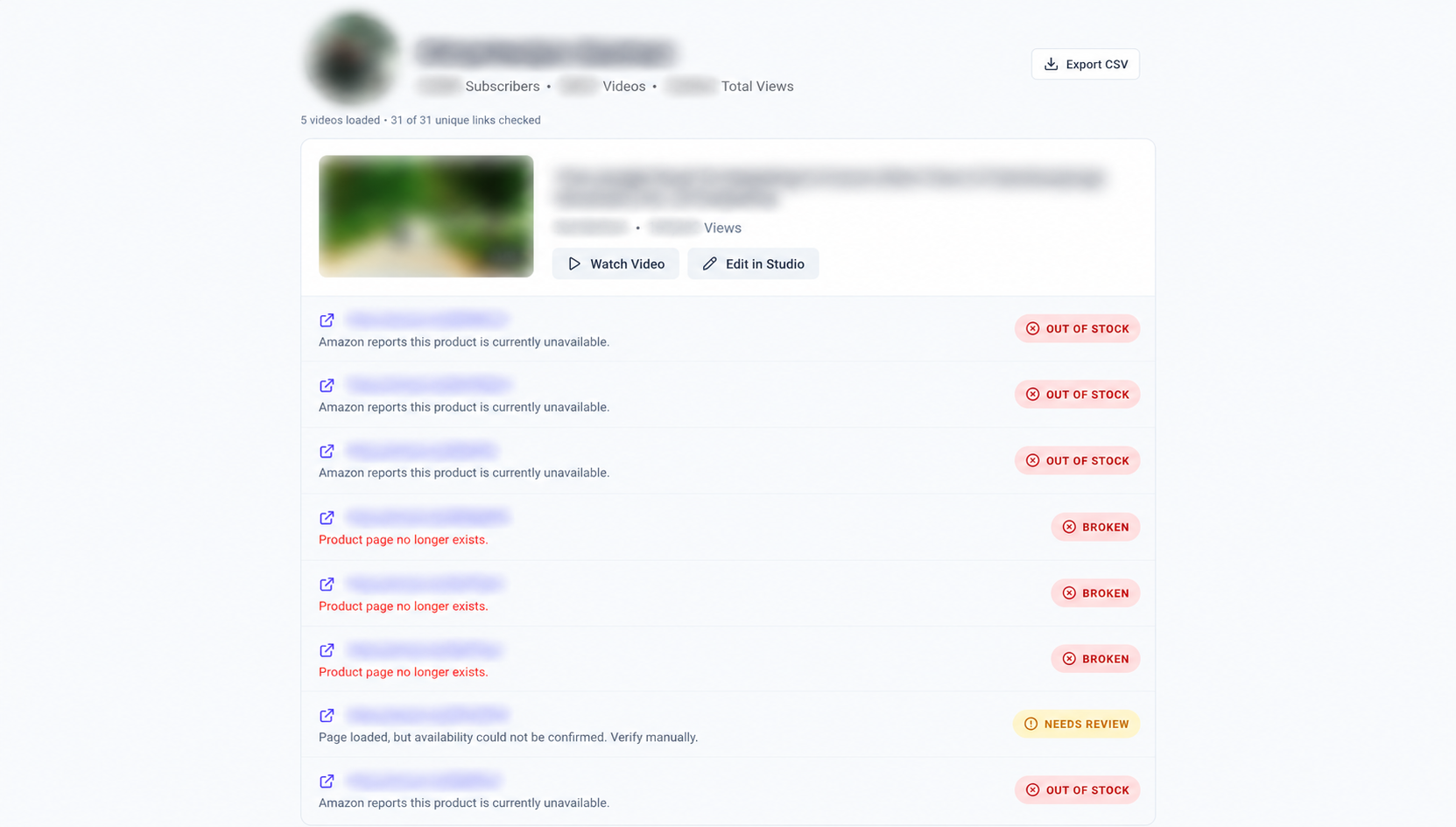
Use the results to decide what deserves attention:
| Result | Your next step |
|---|---|
| Broken or page not found | Open the link, then replace or remove the missing destination. |
| Out of stock | Check availability manually and consider a relevant alternative. |
| Needs review or blocked | Open it yourself; automated access may be restricted. |
| Available or working | Confirm that the destination still matches your recommendation. |
Stock can vary by location, and Amazon may restrict automated requests. Treat a scan as a snapshot, not a promise of availability or commission eligibility. Storefronts and lists are collections, so their checks do not establish whether every product inside them is in stock.
If a video has an all-working summary, select View Links to inspect its destinations. Use Load more videos to continue through the channel or export the results as a CSV for your maintenance list.
3. Replace links using your own Amazon linking tools
When a product link needs replacing, generate the new link through the tools available in your Amazon Associates account. Avoid copying an ordinary product URL from the address bar and assuming it includes your tracking information.
Amazon describes its affiliate URLs as Special Links: they must use the tagged formats provided by the program for tracking. Its Associates operating agreement explains the relationship between properly formatted links and qualifying purchases.
A tag= parameter is a useful check on many Amazon affiliate destinations. A short amzn.to URL may reveal tracking only after it redirects, so inspect the resolved destination as well. Do not delete query parameters while tidying a URL unless you know what they do.
Finding a tag is only one part of the review. Confirm in your Associates account that you are using your own intended tracking ID and the appropriate marketplace. A scanner cannot verify account ownership or determine whether a particular order will earn a commission.
4. Offer relevant alternatives without rewriting history
If the exact item in an older video has been discontinued, be clear about the replacement. A viewer should not have to discover that the linked product differs from the one demonstrated.
For example, update the label to something like:
Original microphone: currently unavailable. Current alternative: [product name].
Use a current affiliate link you generated yourself for the alternative. Choose it because it serves the same need, and explain meaningful differences such as compatibility, connection type, or size. Remove recommendations you can no longer stand behind.
For an international audience, review whether your destination fits the marketplace viewers use. An active Amazon.com link does not establish availability on Amazon.in, or vice versa. Check your program's own options before assuming international clicks will be attributed as expected.
5. Keep your affiliate disclosure easy to find
Link maintenance includes reviewing the surrounding description. Amazon's social media disclosure guidance calls for clear, conspicuous disclosure near affiliate links and identification as an Amazon Associate.
Its required identification statement is:
As an Amazon Associate I earn from qualifying purchases.
Check the guidance for your marketplace and keep the relevant disclosure visible where viewers encounter your recommendations. Do not assume that a disclosure on a separate page will explain every link in a video description.
6. Separate link health from earnings performance
After repairing your descriptions, use your Amazon reporting tools to review clicks and earnings over time. A working, correctly tagged link fixes a technical prerequisite; it does not guarantee a sale or a qualifying purchase.
If earnings remain lower than expected, review the product's relevance, the audience's location, your account status, and the program's current terms. Link checks cannot diagnose every attribution or payment issue.
Avoid changing many unrelated things at once when assessing a repair. Keep a short record of which video, destination, and description label you updated so you can revisit the result later.
A maintenance routine you can actually keep
Start with ten videos that still receive views. Audit their descriptions, fix the clearest problems, and set aside uncertain results for manual review. Repeat when viewers report trouble, a recommended product disappears, or you update a buying guide.
A useful checklist is:
- Scan the video or channel.
- Review broken, unavailable, and uncertain links first.
- Generate replacement affiliate links in your own account.
- Update product labels and review disclosures.
- Save the description in YouTube Studio.
- Scan again after the changes are public.
For a more detailed walkthrough, read how to audit YouTube description links or use the affiliate link review checklist.
Ready to check your older uploads? Audit your YouTube links with CreatorLinks and give viewers a clearer path to the products you recommend.